

Every shopper sees the member price. Only logged-in club members pay it.
That’s the whole idea, and it touches every price on the store: product cards, search, recommendations, the cart and the checkout. Calculating a member price is easy. The craft in Shopify member pricing is making every one of those places tell the same story, on the right day, with a checkout that charges exactly what the page promised.
At DTAILS we built that layer on Shopify Plus for a retailer with physical stores, a webshop and a customer club, IKEA Family style. Prices are planned in the ERP (the system that runs stock, purchasing and pricing), and campaigns run on fixed dates. I built the storefront side; a backend colleague built the checkout.
Key takeaways
- Shopify has no native member price list for regular shoppers. Catalogs don’t cover clubs; segment discounts only show in the cart.
- Let the ERP own the prices. It writes a dated price plan to every variant each night, with Shopify’s own price as the fallback.
- One shared rule decides the price story everywhere. Member beats campaign, campaign beats sale, one savings claim per product.
- Liquid’s “now” is cached. Take the date from the price data, then check it in the browser.
- The page never promises what the checkout won’t charge. Every display rule mirrors a checkout rule.
- Write the precedence rules down before anyone designs a badge, and decide what the page shows when the feed is late.
What Shopify gives you for member pricing, and where it stops
Out of the box, a variant has a price and a struck-through “before” price. Two newer tools get closer, but not close enough:
- Segment-limited automatic discounts (API 2025-10, and in the admin since Winter ‘26) cover “members get 10% off”. But they only show up in the cart: no Liquid property exposes the discounted price earlier.
- Catalogs set prices per market, B2B company location or sales channel, and B2B catalogs reached every paid plan this spring. A club of regular shoppers isn’t a context a catalog can target.
The retailer needed a fixed member price per product, set by date in the ERP and visible before the cart. And no, this isn’t dynamic pricing: the only inputs are the calendar day and whether the shopper is a logged-in club member.
How we built member pricing on Shopify: three layers
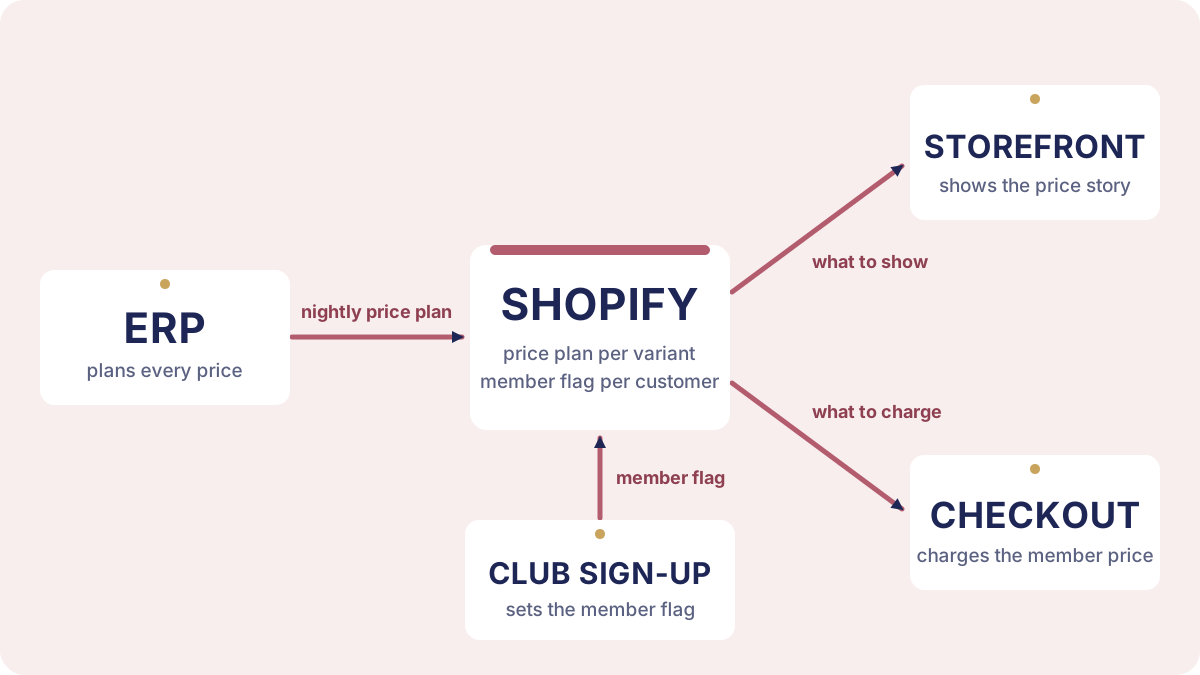 The ERP plans every price and Shopify stores it. The storefront shows it, the checkout charges it, and joining the club marks the customer as a member in Shopify.
The data: a dated price plan
Every night the ERP writes a price plan for the next few days into a metafield on each variant. Simplified:
| Normal price | Campaign price | Member price | |
|---|---|---|---|
| Today | 2,499 | 1,999 until tomorrow | 2,499 |
| Tomorrow | 2,499 | 1,999 until tomorrow | 2,499 |
| Day after | 2,499 | — | 2,249 |
Today and tomorrow, the page shows a campaign price. The member price just repeats the normal price, so no member deal is shown. On the third day the campaign is gone and the member price takes over, without anyone logging into Shopify at midnight.
The normal price always comes from Shopify’s own price field, so a late or broken plan can’t show a wrong one. That’s logic as data, not code in practice. Campaign names and badge colours live in metaobjects the merchant edits, so a new badge needs no developer.
The storefront: one rulebook for every surface
Two copies of a price rule will eventually disagree, and then a shopper sees a member price and a sale badge on the same product. So every place that shows a price (product cards, the product page, search results, recommendations, the cart) asks one shared function the same question: for this product, today, what’s the price story?
The answer follows four short rules. A member price beats a campaign, a campaign beats a plain sale, and a sale beats the normal price. And no product ever makes two savings claims at once. The function is 68 lines, easy to test on its own, and the only place those rules live.
One tip if you build this: centralise the markup as well as the rules. A price that renders from one snippet changes in one place; a price rendered in five templates needs five edits every time the rules move.
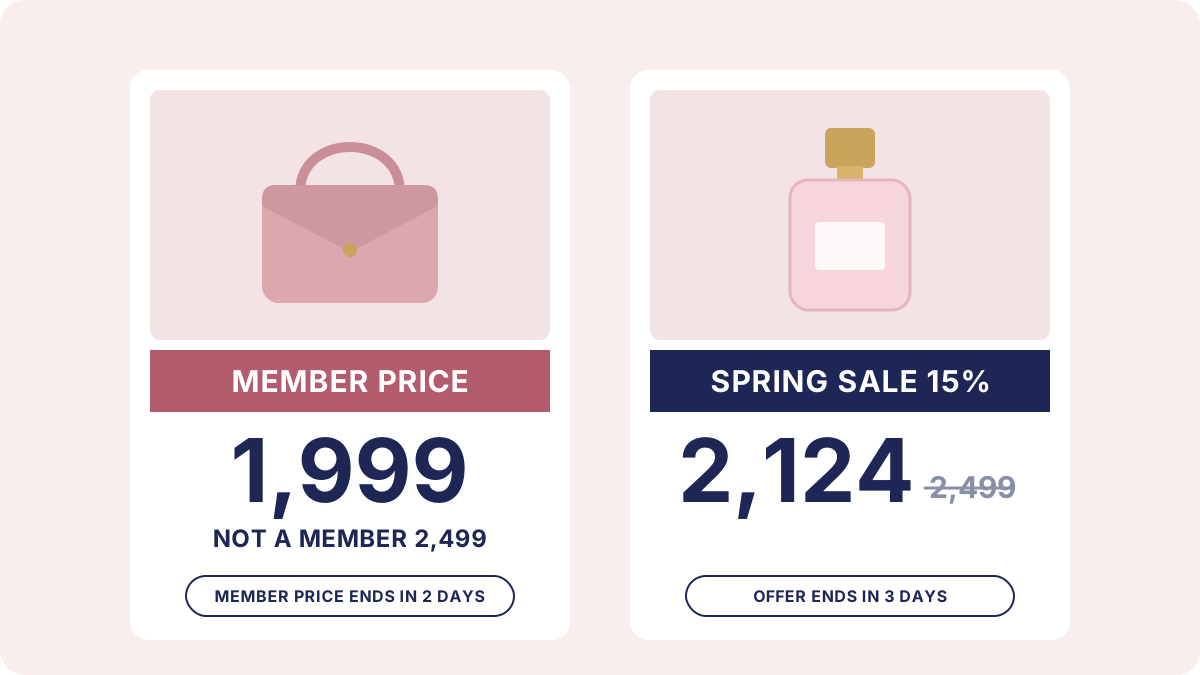 A member day (left) and a campaign day (right). One savings claim per product, and only the sale gets a before price and an “offer ends” line.
The checkout: charging it
At checkout, a Shopify Function (code Shopify runs on its own servers while it calculates the cart) gives logged-in members their price as a line discount, and the cart shows that line in the same member layout as the product card. Joining happens in the cart too: a sign-up form tags the customer, and a small Shopify Flow automation marks them as a member.
Getting the timing right
Midnight and the page cache
The price plan is keyed by date, so the storefront needs to know what “today” is. Liquid can tell you, but Shopify caches rendered pages, and its docs say the timestamp “might not be updated for every page view, depending on the context and caching.” A page cached just before midnight could show yesterday’s prices well into the next day.
So the server takes the date from the price plan itself, which never changes for a cached copy. On the product page and in search, a small script then checks the real date in the shop’s time zone. If the nightly export is late, the page shows the last known day rather than no member prices at all.
We designed for this from the start, and no stale price has been reported.
Member prices from the moment you log in or join
In our testing, Shopify recalculated the member discount when the cart changed, not when the shopper logged in. Shopify doesn’t document login as a trigger either way, and other merchants report carts keeping non-member prices after login. So if a logged-in member’s cart still shows non-member prices, the storefront sends one empty cart update that changes nothing, which is enough for Shopify to recalculate.
Sign-up needed one more step. Membership is granted by a small automation a few seconds after the form is sent, and by then nothing is asking the cart any more. So after sign-up the storefront re-checks the cart a few times over the next minute and a half and redraws the prices the moment the member discount lands. For the shopper, the prices simply switch to member prices while they’re still in the cart.
The rules that keep the page honest
Four small rules make sure the page never promises a price the checkout won’t charge:
- An equal member price is no member price. Feeds often repeat the normal price as the member price, so the member display only appears when it’s genuinely lower.
- A zero price is missing data, not a giveaway. It’s hidden.
- Multi-buy offers copy the checkout’s rules. A “2 for X” offer is only advertised where the checkout would actually apply it.
- A member price is never called an offer. The client was explicit that a member price must not look like a sale. So the countdown says “member price ends”, not “offer ends”, and “not a member” is never struck through. My reading of the European Commission’s price-reduction guidance is that standing loyalty prices and announced price cuts are treated differently. Not legal advice.
When this pattern fits
It fits when an ERP plans prices that stores and webshop share, the club has fixed prices of its own, and campaigns run on dates. For hand-set prices on a schedule, Plus stores have Launchpad, though it restores pre-event prices when an event ends, which as I read it clashes with an ERP rewriting prices nightly.
What would make this native
Four things Shopify doesn’t do yet, each of which would retire a piece of this build:
- A price list for a customer segment, the way catalogs already work for markets and B2B.
- A way for the theme to show a logged-in customer’s price before the cart, so product cards and checkout read from the same source.
- A documented rule for when discount Functions recalculate, including after login.
- A member discount in checkout without a struck-through original price. Today the checkout strikes through the line’s original price on its own, and the theme can’t change that.
If I’ve got any of this wrong, especially the login behaviour, I’d like to hear it.
Frequently asked questions
Can Shopify show member prices on product pages natively?
Not as a fixed member price per variant. Shopify’s automatic discounts can target customer segments, but they apply in the cart and checkout, and no Liquid property exposes the discounted price earlier. Showing a member price on product cards and pages needs theme code or an app, plus a checkout discount that charges the same price.
Can you use Shopify catalogs for loyalty member pricing?
Not for a club of regular shoppers. Shopify catalogs set prices for markets, B2B company locations and sales channels. A loyalty club isn’t one of those contexts, so member prices need another route, such as a variant metafield read by the theme and a discount Function at checkout.
Why does a Shopify store show yesterday’s price after midnight?
Liquid’s current date reflects when the page was last rendered, and Shopify caches rendered pages, so a cached page can carry an old date. For date-driven prices, take the date from the price data on the server and check it in the browser in the shop’s own time zone.
Do Shopify discount Functions re-run when a customer logs in?
Shopify doesn’t document login as a trigger, and other merchants report discounts not applying until the cart changes. We send one empty cart update after login, one that changes nothing, and that is enough to make Shopify recalculate the discount.
Do you need Shopify Plus for custom member pricing?
For a custom app with Shopify Functions, yes: only Shopify Plus stores can use custom apps that contain Functions. On other plans, member pricing comes from public App Store apps that bring their own Functions.
Takeaway
The ERP already knew the member price. The work was making every surface agree with it, on the right day, and making sure the checkout charges what the page promised. If you’re planning member prices, start by writing the precedence rules down.
Working on something similar? I’m always happy to compare notes: get in touch or find me on LinkedIn.