
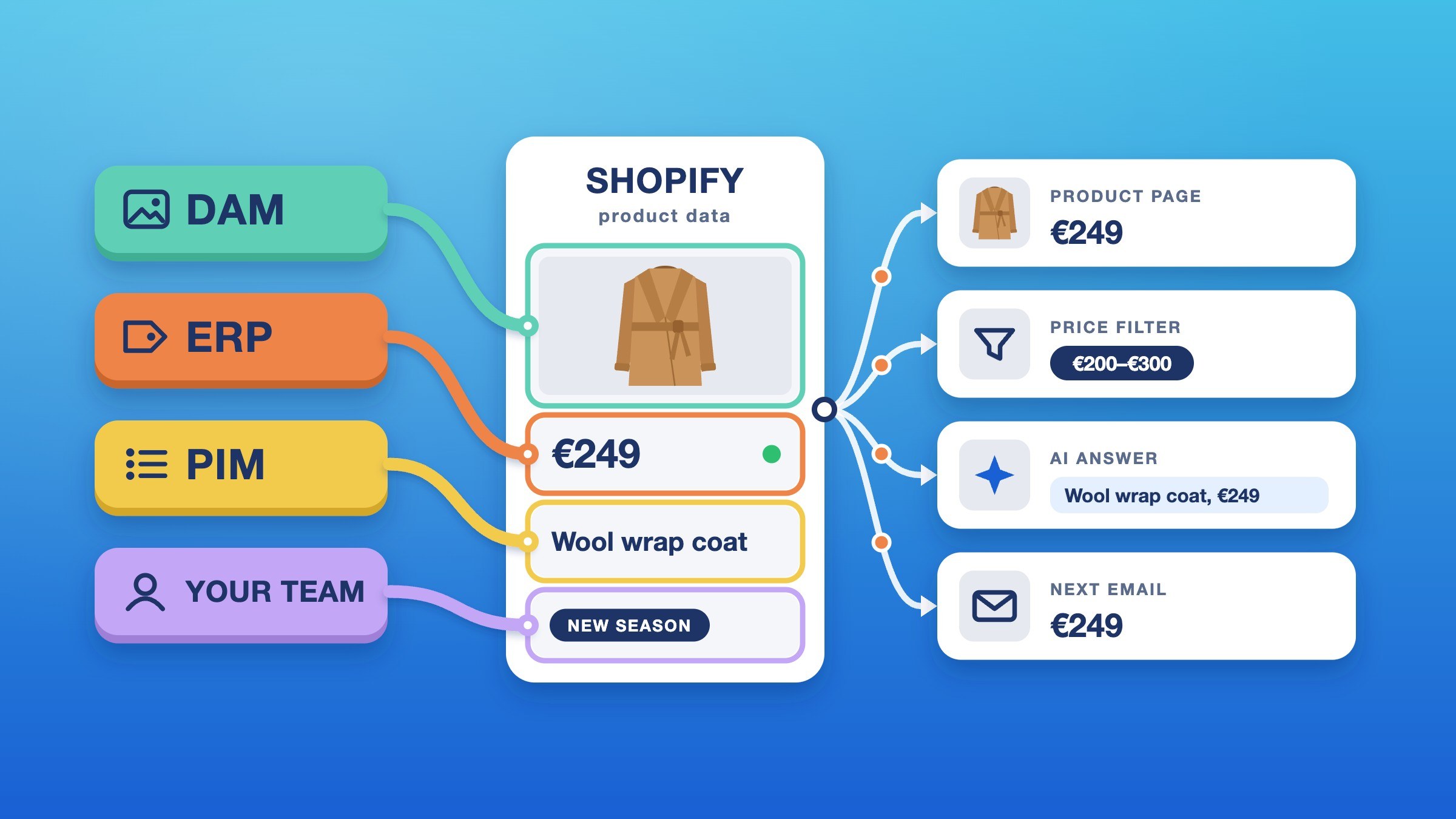
We were asked to link each product’s regulated label to its official document, using a field in the DAM. Before building anything, we checked that field on every product in the catalogue. It was empty on all of them.
At dtails we build the Shopify storefront for a large retailer with physical stores. On a store like that, the check comes before any code, because the product page is the last stop for data that starts somewhere else. Prices and stock come from the ERP, texts and specs from the PIM, images and documents from the DAM. A search engine and a handful of apps then read the same product data for their own jobs.
If a value is wrong at the source, every one of those readers gets it wrong. If the website patches it, only the website is right. It’s like correcting a price with a marker on one shelf label: that shelf is right, while the till, the flyer and the app still show the old price. The work, then, is agreeing who owns each field, what the page does when it’s empty, and how every system shows the same version of a product.
Five rules for a store fed by many systems
- Keep an owner list for every field the page reads. One row per field, metafields and Shopify’s own fields alike: the system that writes it, the level (the whole product, or each size or colour) and what the page shows when it’s empty. When a value goes missing, the list says who fixes it, before anyone opens the theme code.
- Fix data at the source, never in the theme. A patch in Liquid or JavaScript makes the website right and every other reader wrong. If a fallback field is genuinely right, its owner signs it off and it goes on the owner list.
- Render third-party search with the theme’s product card. The search engine decides what matches and in what order. The theme’s card then draws price, badge and stock from the same Shopify data as the product page.
- Ship an admin setup list with every release. Metafield definitions, metaobject entries, Storefront API access and Catalog mappings live in the Shopify admin, not in the theme. They apply to every theme at once, so a theme preview can’t hold them and a rollback can’t undo them, even when someone saved them “just to test a preview”.
- Hide sections when their data is empty. Shoppers see no gap, and in the theme editor a notice names the missing field, so a feature can launch before its data. One of ours launched before any of its images existed and was built to switch on with the first upload.
Four sources write your product data. None of them is the website.
| System | What it owns | Where it lands in Shopify |
|---|---|---|
| ERP | Prices, campaigns, stock, delivery times | Shopify’s own price and stock fields, plus metafields and metaobjects for dated price plans and campaigns |
| PIM | Texts, specs, certifications | Product fields and metafields, with shared records as metaobjects |
| DAM | Images, documents, icons | Product images, plus file fields for documents and icons |
| Your team | Campaign names, badge text and colours, page content | Metafields and metaobjects edited in the admin |
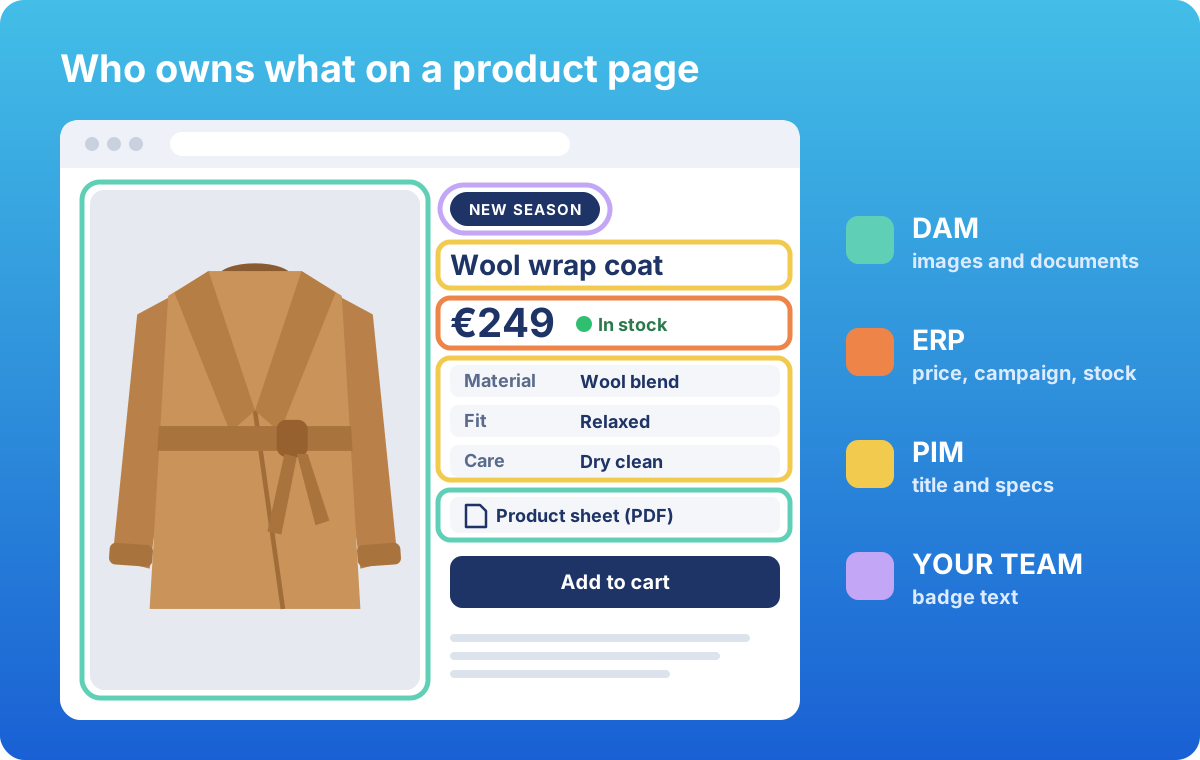 One product page, four owners. The website owns none of the data on it.
Each system reaches Shopify through a connector or an integration layer, usually run by that system’s partner. Metafields are Shopify’s custom fields; metaobjects are reusable records with fields of their own. Each system writes to its own set of metafields, its namespace, apart from the fields your team edits by hand. Shopify can’t make a store’s own metafields read-only, though: a value the ERP writes can still be overwritten by hand in the admin, because merchants always have full control of those fields. That’s why the owner list matters. The ERP’s dated price plans, for example, are what drive the member prices I wrote about earlier.
Your website isn’t the only reader
A wrong value doesn’t stay on the product page. It turns up in filters, reports, search results and AI answers.
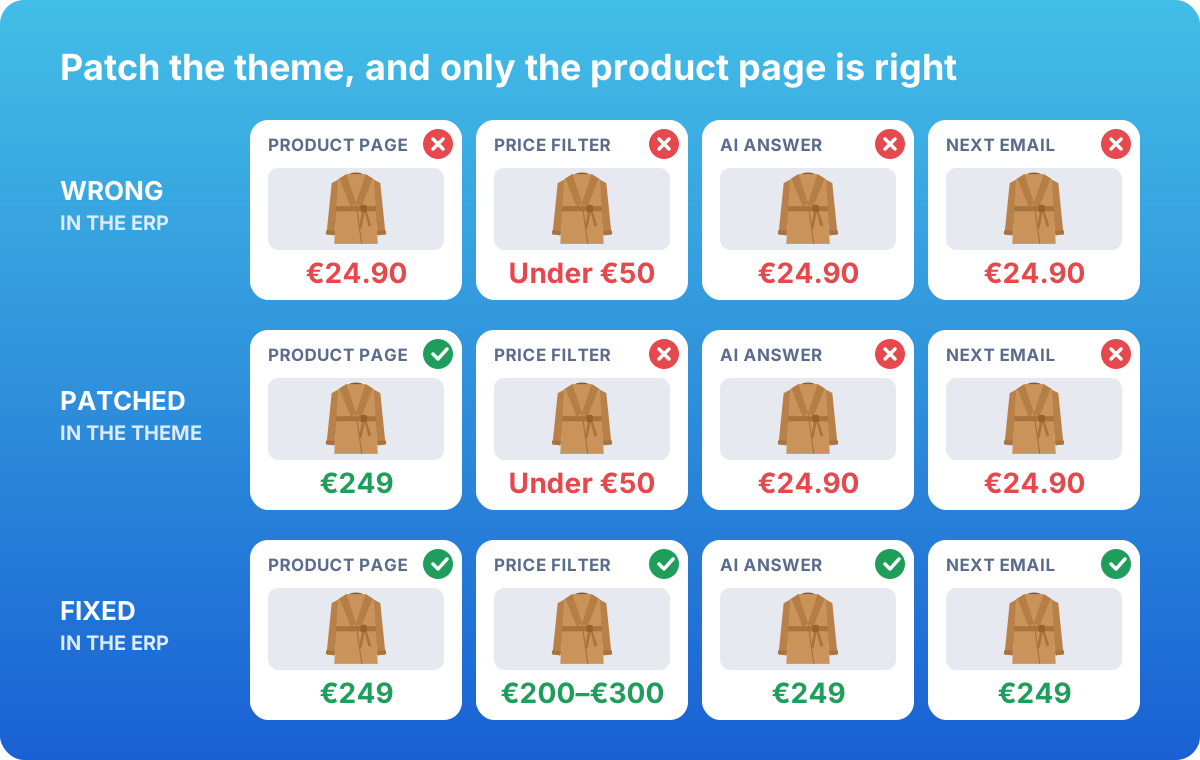 A made-up price that’s wrong in the ERP. Patch the theme and only the product page is right; fix the ERP and every reader is.
Shopify’s own features. Search & Discovery builds filters from product, variant and category metafields of the supported types. Analytics groups reports by metafields once “Use in Analytics” is on for their definition, and by metaobject fields and category fields such as colour and material.
AI channels. Agentic storefronts is on by default for eligible stores. It puts your products in AI channels such as ChatGPT, Copilot and Meta through Shopify Catalog. Since October 2026, Catalog also shares your compare-at prices, so a markdown the ERP gets wrong is wrong in an AI answer as well. You’ll find the switch under Sales channels > Agentic > Shopify Catalog > Review product data mapping.
In that same mapping, you can point a product’s title, description or category at your own metafields or metaobject references, or group products into one listing by a metafield. My read: map only fields that have an owner on your list, because an AI channel will repeat whatever it’s given.
Third-party apps. In our build, the search engine indexes the same Shopify fields the site reads. It owns matching, ranking and facets; the site renders the result tiles with the same product card it uses everywhere else, so a search tile shows the price Shopify holds, not the engine’s copy. Price sorting and filters still run on the engine’s own copy, though, so the first thing I’d ask the vendor is how fast it picks up a change.
Wishlist, review and email apps keep their own copies of products, and an email’s price is fixed the moment it’s sent.
Three decisions we’d make again
The owner list needs a level and an empty state
Ours looked like this, simplified. Two columns save the most arguments later: the level (the whole product, or each size or colour) and what the page shows when the field is empty.
| Product data | Written by | Level | When it’s empty |
|---|---|---|---|
| Material | PIM | Product | The spec row is left out |
| Campaign price | ERP | Variant | The normal price shows |
| Product documents | DAM | Product | No document links |
| Promo text | Your team | Product | The promo block is hidden |
If you build one thing from this article, build this list.
The wrong document is worse than none
Back to the empty field from the opening. The real documents sat in a different field, and that’s the one the link uses. Before anyone builds on a field, ask how many products actually have it filled.
A third field was fuller, and it would have made an easy fallback. But it mixed user manuals in with the official documents, under file names nobody could tell apart. So we left the fallback out, on purpose.
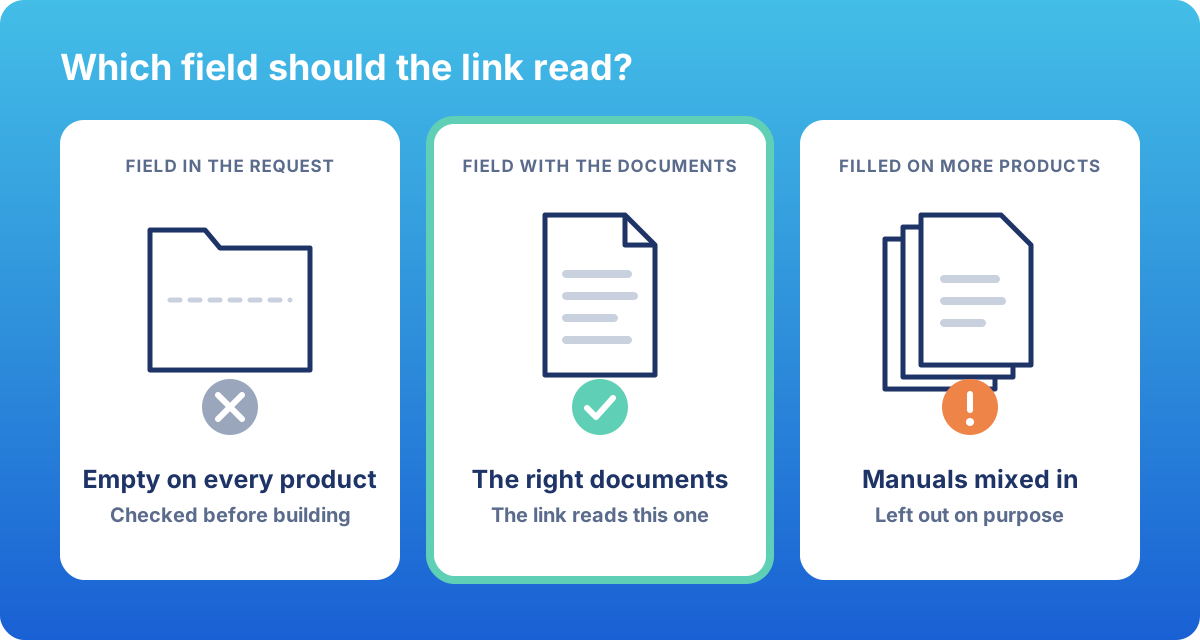 Three fields, one right answer. The fullest field wasn’t it.
Your team owns the words
The ERP knows which products are in a campaign. The PIM knows which ones carry a certification. Neither should decide what the badge says.
So your team writes the badge text, campaign names and colours once, as entries in the Shopify admin, and the site shows the right badge wherever the ERP or PIM data points to it. A new campaign style or certification is a new entry: no developer, no release. The source systems own the facts.
Take a product data walk
Store teams walk the shop floor to see what shoppers see. Product data needs the same habit, because no single report shows a wrong value in a place you don’t own. Once a month, pick ten products: a bestseller, a new arrival, one on campaign, one with several sizes or colours, and a few at random. Look each one up in six places: the product page, your site search, a filtered collection, a Google search, an AI assistant and your latest campaign email. For each place, ask:
- Is the price the same everywhere, campaign price included?
- Is it the right picture, in the right size or colour?
- Are the specs there, in the same units?
- Is anything empty that the PIM says is filled?
- Who fixes it, according to the owner list?
Fix what you find at the source, then walk the same ten products again next month.
Ask your partners these before the next release
- Your PIM or ERP partner: Which fields does the connector fill, at which level, and with what kind of value (text, number, file or list)? Where do translations land? When a value is removed at the source, is it cleared in Shopify or left as it was? Can the connector fill Shopify’s category metafields, such as colour and material, where they fit? Analytics reads those with nothing to turn on. And what alerts you when a feed stops?
- Your search vendor: Does it read from Shopify or from its own feed? How quickly does it pick up a change? Does its click tracking still work when results are rendered with your own product card?
- Your agency: What does each section show when its data is missing? Does every release come with a setup list? Which fields are clean enough to map to Shopify Catalog?
Three things I’d like Shopify to build in
Shopify doesn’t do these yet, and each one would retire a piece of this setup:
- A read-only option for the store’s own metafields. Today a connector can lock fields only in its app’s reserved namespace, and then other apps can’t read them.
- Variant data as a dynamic source. Shopify’s list of what you can connect in the theme editor has no row for variants, and in our build the editor didn’t offer them.
- Store setup you can copy between stores, the way apps already declare their fields in a file. Today that takes the Admin API or an app. Our read: much of the setup list would become that file.
If I’ve got any of this wrong, especially what reaches Shopify Catalog, I’d like to hear it.
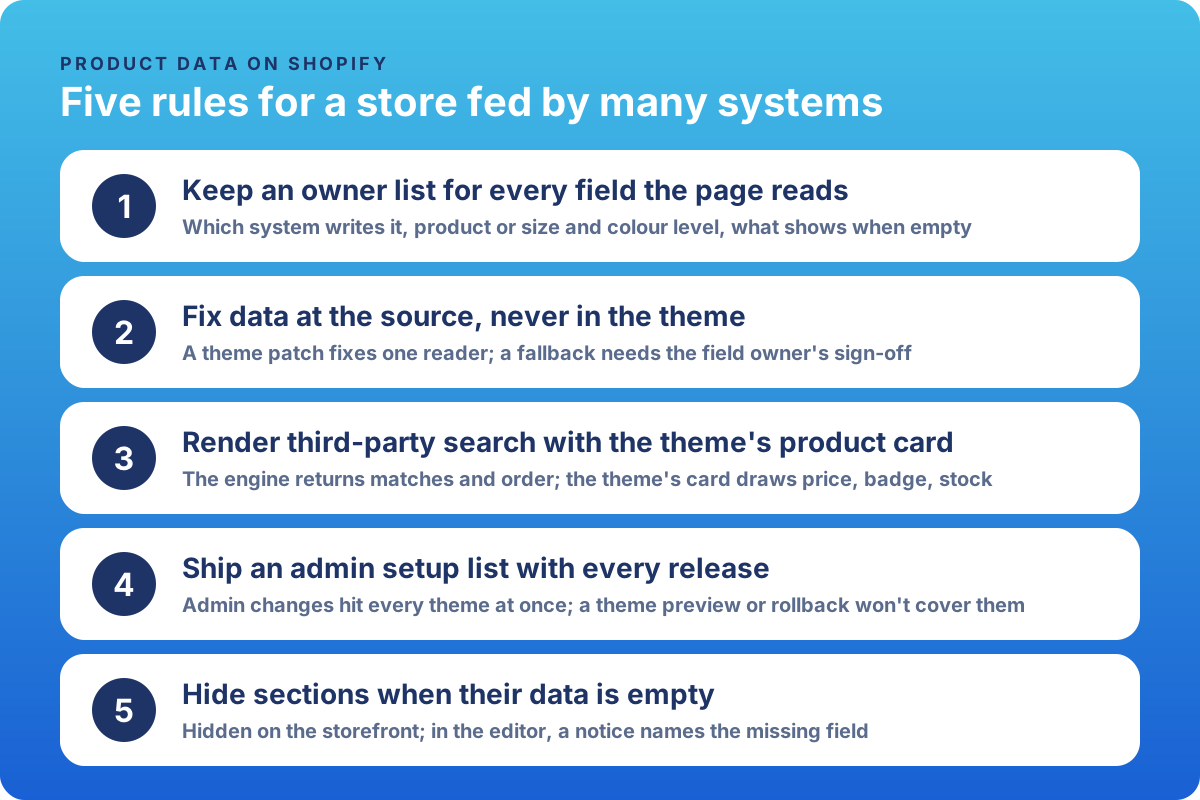 The five rules on one card, to save or share.
Frequently asked questions
What’s the difference between an ERP, a PIM and a DAM?
The ERP runs the business side: purchasing, pricing, stock and orders. The PIM is where product content is written and enriched: texts, specs, categories. The DAM is the library of approved images and documents. On Shopify, each one should write to its own fields, and the website only reads them.
Why does search show a different price from the product page?
Two common causes: the search tool keeps its own copy of the catalogue and hasn’t picked up the latest change, or it draws its own product tiles with its own price logic. Rendering search results with the site’s own product card removes the second cause. For the first, ask the vendor how quickly its copy picks up a change.
Do AI shopping agents read our product data?
Yes, in more than one way. Shopify Catalog shares your products, and since October 2026 your compare-at prices, with AI channels such as ChatGPT, Copilot and Meta; Google AI Mode and Gemini get your products through the Google & YouTube channel or Merchant Center. An agent that visits your product page reads what the page shows. I wrote more about why data quality matters for agentic storefronts.
Why is a field empty on our site when it’s filled in the PIM?
Two causes we’ve seen: the site reads a different field from the one the integration fills, or the integration fills it on each variant (each size or colour) while the site looks for it on the product. Check it against your owner list with your partner before anyone builds a workaround.
Takeaway
Fix the price at the source, not with a marker on one shelf label. Then the next redesign, search vendor or AI channel starts from data that’s already right.
Working on something similar? I’m always happy to compare notes: get in touch or find me on LinkedIn.