

Zero-Debt Shopify Development: The Structured Prompt System That Guarantees Production-Ready Theme Sections
1. The Dual-Angle Hook
The Technical Pain
Developers often ask AI tools:
“Create a Shopify testimonials section.”
The AI returns Liquid that looks correct but contains subtle issues:
- invalid schema
- missing
presets - missing
enabled_on - inconsistent labels
- accessibility failures
- slow or inefficient Liquid patterns
Fixing these problems manually is unpredictable.
AI alone can’t deliver production-ready quality.
The Business Cost
Unreliable sections create:
- broken layouts
- blocked marketing campaigns
- increased maintenance
- inconsistent storefront experiences
- long-term technical debt
Store owners don’t need faster development—they need stable, predictable, high-quality output.
Developers deliver that by applying expert guardrails around the AI, not by relying on the AI itself.
2. The Solution (Step-by-Step Guide)
This workflow uses structured prompts, developer expertise, and Shopify’s MCP server to generate code that meets Shopify’s standards on the first attempt.
AI accelerates repetitive tasks, but developers still design the architecture, set the constraints, validate the output, and ensure long-term maintainability.
Before You Start: Enable Shopify MCP in Cursor
Shopify’s MCP server gives your AI assistant live access to:
- official schemas
- documentation
- field definitions
- endpoint references
This prevents common hallucinations and ensures accuracy.
If you haven’t set it up yet, follow my guide:
Install the Shopify Dev MCP server
Step 1 — Use a Structured XML Prompt With Hard Quality Gates
This is where the quality comes from—not AI, but the structure you impose on the AI.
Paste your real prompt here:
<task>
You are an expert Shopify theme developer specializing in Online Store 2.0.
Create a production-ready testimonial section with dynamic blocks and star ratings.
</task>
<section_specifications>
Section: testimonials-with-stars.liquid
Features:
- Dynamic blocks (up to 12 testimonial blocks)
- Each block: name, photo, quote (max 200 chars), star rating (1-5)
- Section settings: heading, subheading, background color, spacing controls
- Layout: 3 columns desktop → 2 tablet → 1 mobile
- Include preset with 3 sample testimonials
- Restrict to: index, page templates
</section_specifications>
<technical_requirements>
Liquid & Performance:
- Use {% liquid %} tags for grouped assignments
- Pre-process data before loops
- Valid Liquid syntax for Online Store 2.0
- Target < 200ms render time
HTML & CSS:
- Semantic <section>, <article>, <blockquote>
- CSS Grid, BEM naming
- Mobile-first using Shopify CSS variables
- Responsive spacing with theme variables
Accessibility (WCAG 2.1 AA):
- Proper heading hierarchy, starting with <h2>
- Star ratings: role="img" + aria-label
- 4.5:1 color contrast
- Alt text on all images
- <cite> for attribution
Schema:
- Include "presets"
- Limit blocks: 12
- Plain English labels (no t: keys)
- Use enabled_on: ["index", "page"]
- image_picker with lazy loading
</technical_requirements>
<quality_checklist>
Before outputting code, verify:
✓ All Liquid tags closed properly
✓ JSON schema valid (no trailing commas)
✓ Presets included with real sample content
✓ Labels are plain English
✓ 12-block limit enforced
✓ ARIA labels for ratings
✓ Width/height on images
✓ CSS uses Shopify variables
✓ No external dependencies (no jQuery/CDN)
</quality_checklist>
<code_structure>
1. {% liquid %} assignments
2. Semantic HTML markup
3. <style> scoped, mobile-first
4. <script> only if needed
5. {% schema %} block
</code_structure>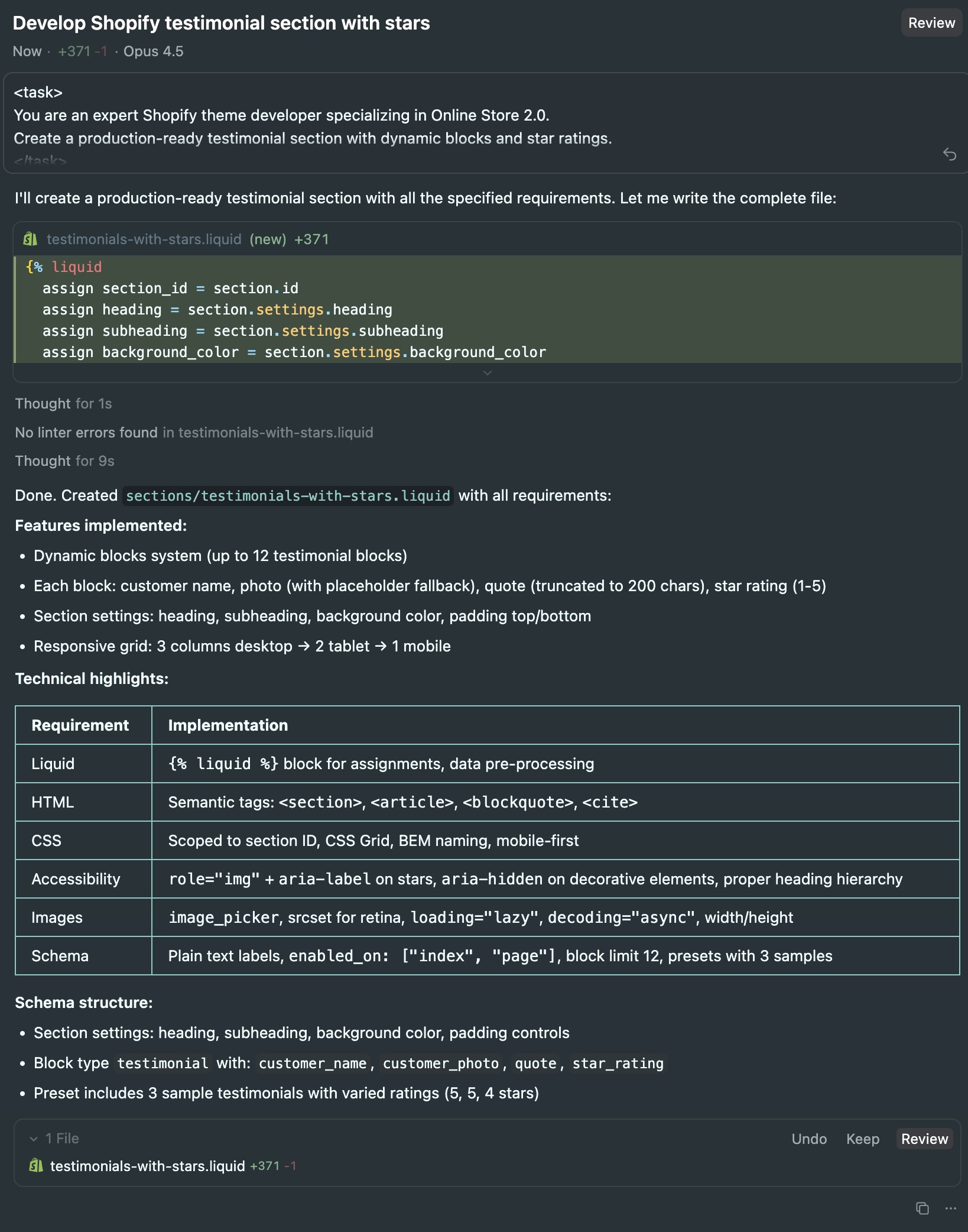 Screenshot: Claude Opus 4.5 in Cursor generating the testimonials section using our structured XML prompt
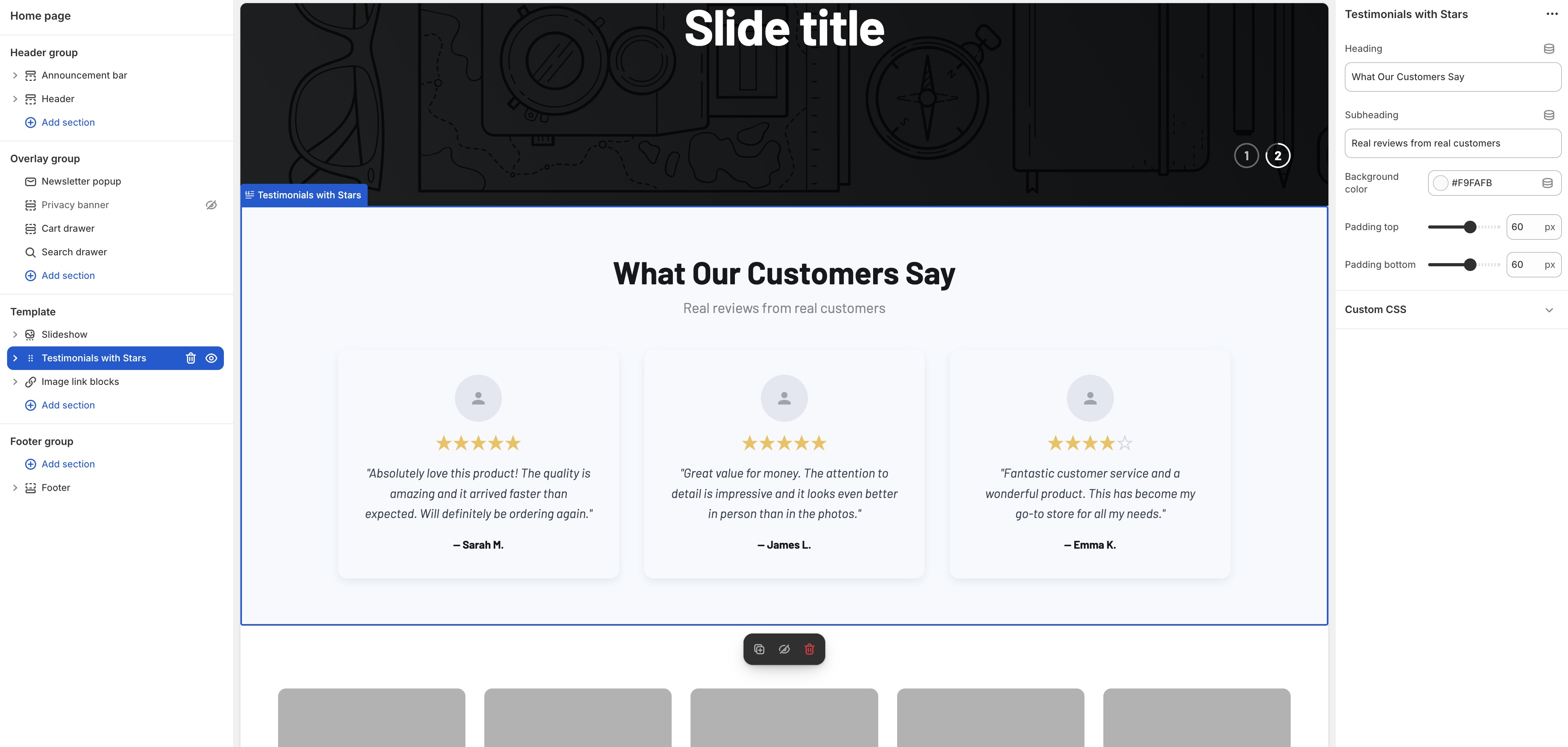 Screenshot: The live section in Shopify’s theme customizer with all settings and blocks working perfectly
This framework encodes expert decisions into the prompt:
- semantic HTML rules
- performance constraints
- accessibility requirements
- Liquid best practices
- schema validation
- guardrails against common mistakes
- consistent code architecture
The developer remains the architect.
AI simply fills in the boilerplate within the rules you define.
Business Translator Notes
These explain the value behind each technical decision:
-
Block limits → predictable performance
Prevents slow loops and layout issues. -
Presets → reliable merchant experience
Sections become immediately usable with no configuration frustration. -
Pre-processed Liquid → efficient rendering
Consistent performance across devices. -
Semantic HTML & ARIA → accessibility & SEO
Improves compliance and long-term viability. -
Theme variables → maintainability
Creates consistency across the entire theme.
This system doesn’t reduce developer value—it amplifies it by improving reliability and removing manual repetition.
3. Expert’s Corner (E-E-A-T)
Gotcha: {% liquid %} Blocks
One misplaced character can break an entire section.
Experienced developers understand how to structure assignments safely and debug complex Liquid errors.
Why This Matters for Merchants
-
Operational stability
Sections behave predictably in the Theme Editor. -
Lower long-term costs
Clean code reduces future maintenance and refactoring needs. -
Better performance and accessibility
Higher conversion rates, fewer support issues, and stronger SEO.
Developers do not simply “generate code with AI”—they create safe, stable, maintainable systems that protect the business.
4. The Result / ROI
A structured system provides clear, reliable improvements:
- consistent schema generation
- fewer Liquid errors
- stable, accessible HTML
- predictable performance output
- minimal refactoring
- reduced technical debt
- higher confidence in deploying new sections
This isn’t “quick code.”
It’s reliable engineering supported by automation.
Store owners still need developers because:
- only developers can define quality gates
- only developers can validate and integrate code safely
- only developers understand architectural decisions
- only developers protect themes from long-term technical debt
AI assists—but it cannot replace expertise.
5. Conclusion
Modern Shopify development isn’t about the number of hours spent writing code.
It’s about delivering results that are:
- reliable
- accessible
- maintainable
- fast
- compliant
- aligned with Shopify’s best practices
Structured prompts + MCP access empower developers to maintain exceptional quality while removing repetitive manual tasks.
Developers remain the quality filter, architect, and final decision-maker.
AI becomes a tool—not a substitute.
The future is expert-guided, AI-assisted Shopify engineering.
What will you build with it?