
🔥 AI Hallucinations on Shopify Are Real—Here’s How to Fix Them
Most AI coding assistants are smart—until you ask them a question about Shopify. Without real-time context, they hallucinate field names, Liquid syntax, or API endpoints. This often turns a 3-hour debugging task into minutes of frustration.
The solution? The Shopify Dev Model Context Protocol (MCP) Server. It connects your AI assistant directly to Shopify’s developer ecosystem, transforming it into a specialized Shopify expert and dramatically cutting development time.
Learn more from Shopify: Shopify Dev MCP Server Documentation
🧠 What the Dev MCP Server Does
The Dev MCP server is a local process that runs automatically in the background, bridging your AI development tool (like Cursor or Gemini CLI) to all Shopify developer resources.
- Real-Time API Context: Your assistant can introspect the Admin GraphQL schema on demand, generating accurate, current API calls.
- Documentation Search: Hyper-accurate searches across Shopify.dev, including Functions, Polaris Web Components, and Liquid docs, provide instant guidance.
- Fewer Hallucinations: Grounding the AI in the real Shopify ecosystem dramatically reduces “almost right” code, so you focus on building, not fixing.
- Massive Time Savings: Tasks that used to take hours can now be done in minutes.
💡 How to Talk to Your New Shopify Expert
Once the Dev MCP server is running locally, your AI assistant stops guessing and starts delivering schema-accurate, doc-backed code.
Here are the types of high-value questions you can ask:
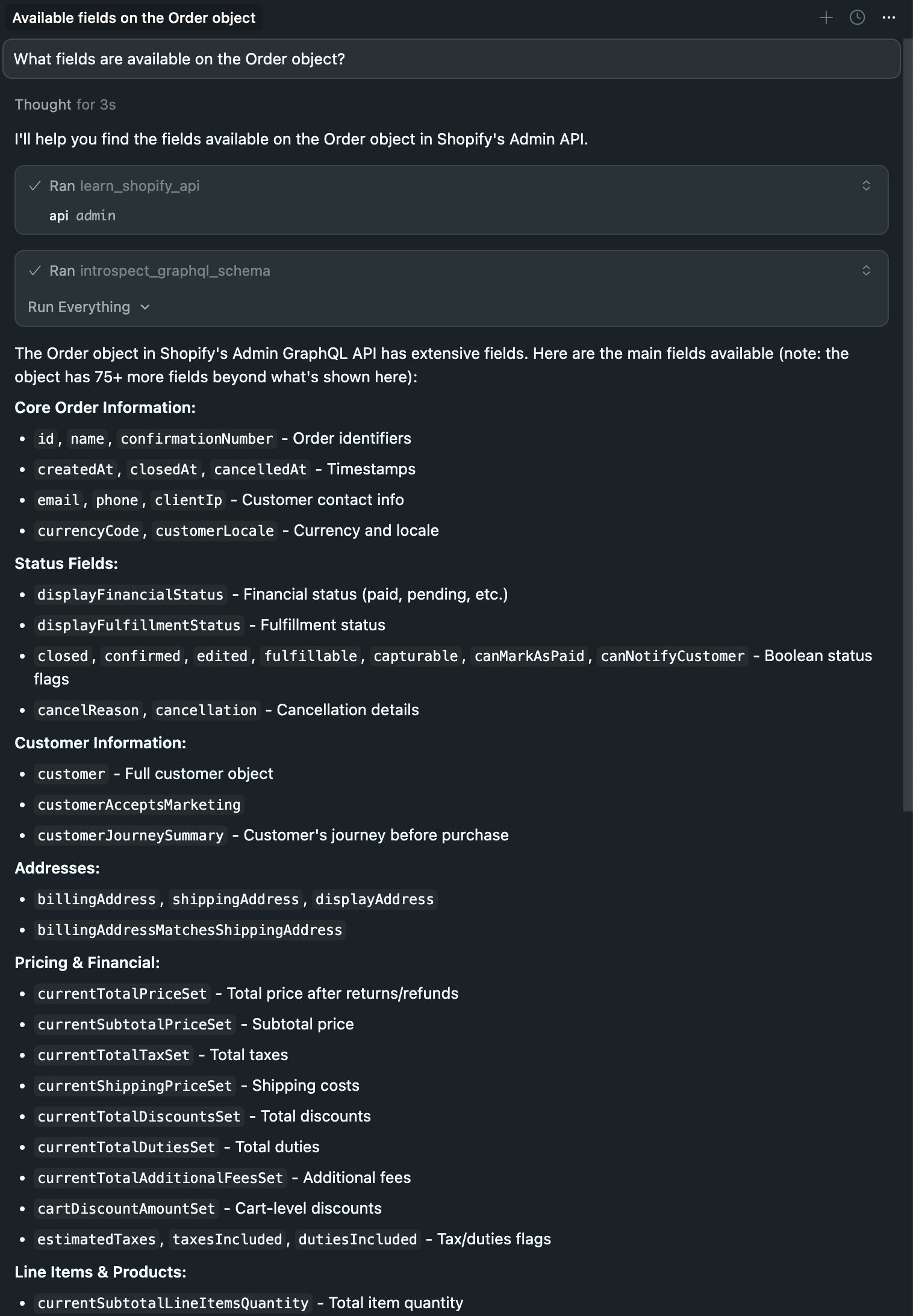
- API & Schema Exploration: “What fields are available on the Order object?” or “What’s the difference between Admin API and Storefront API?”
- Complex Feature Building: “Build a new POS UI extension that shows all the product SKUs of the order in the order details screen.”
- Implementation Guidance: “How do I authenticate my Shopify app?” or “Show me an example of a webhook subscription.”
Here’s a live example in Cursor:
⚡ Quick Setup for Cursor
The easiest and most reliable way for developers to run the Shopify Dev MCP server is using the official package via npx.
Step 1:
npx -y @shopify/dev-mcp@latestStep 2:
Open Cursor and go to Cursor > Settings > Tools & MCP
Step 3:
Click “New MCP Server”
Step 4:
Add this configuration:
{
  "mcpServers": {
    "shopify-dev-mcp": {
      "command": "npx",
      "args": ["-y", "@shopify/dev-mcp@latest"]
    }
  }
}
Step 5:
Restart Cursor
That’s it! Your AI assistant now has direct access to Shopify’s development resources.
Need more details? Check out the official setup guides:
If you are a Shopify developer, store owner, or agency leader, you’re leaving money on the table if your team isn’t using this. Stop debugging generic AI code and start leveraging a truly context-aware partner.
#ShopifyDev #Ecommerce #AIAssistant #ModelContextProtocol #Frontend